
Making Supercut.org
This weekend, I was invited to participate in Rhizome’s Seven on Seven in NYC — an event that pairs seven artists with seven technologists, challenging them to create something in one day and present it to an audience the next day.
The other teams were a humbling roster of creative geeks, including Ricardo “mrdoob” Cabello, Ben Cerveny, Jeri Ellsworth, Zach Lieberman, Kellan Elliott-McRea, Chris “moot” Poole, Bre Pettis, and Erica Sadun.
I was paired with Michael Bell-Smith, whose digital art I’d admired and linked to in the past. It was a perfect match, and we’re very happy to announce the result of our collaboration: Supercut.org (warning: NSFW audio).
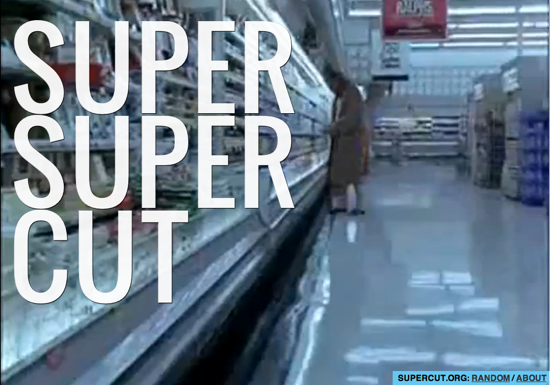
Supercut.org is an automatic supercut composed entirely out of other supercuts, combined with a way to randomly shuffle through all of the supercut sources.
The Idea
When we first started work on Friday morning, Michael and I started brainstorming what we wanted to accomplish: something visual, high-concept (i.e. explainable in a tweet), and hopefully with a sense of humor.
We quickly realized that our interest in supercuts was fertile ground. Michael’s work often touches on structural re-edits and remixes, such as Oonce-Oonce, Battleship Potemkin: Dance Edit, Chapters 1-12 of R. Kelly’s Trapped in the Closet Synced and Played Simultaneously, and his mashup album mixing pop vocals over their ringtone versions.
Both of us were fascinated by this form of Internet folk art. Every supercut is a labor of love. Making one is incredibly time-consuming, taking days or weeks to compile and edit a single video. Most are created by pop culture fans, but they’ve also been used for film criticism and political commentary. It’s a natural byproduct of remix culture: people using sampling to convey a single message, made possible by the ready availability of online video and cheap editing software.
So, supercuts. But what? Making a single supercut seemed cheap. I first suggested making a visual index of supercuts, or a visualization of every clip.
But Michael had a better idea — going meta. We were going to build a SUPERSUPERCUT, a supercut composed entirely out of other supercuts. And, if we had time, we’d make a dedicated supercut index.
Making the SuperSupercut
There were three big parts: index every supercut in a database, download all the supercuts locally, break each video into its original shots, and stitch the clips back together randomly.
Using my blog post as a guide, Michael added every supercut to a new table in MySQL, along with a title, description, and a category. While Michael did that, I wrote a simple script that used youtube-dl to pull the video files from YouTube and store them locally.
To split the clips, we needed to find a way to do scene detection — identifying cuts in a video by looking at movement between two consecutive frames. But we needed a way to do it from my Linux server, which ruled out everything with a GUI.
After some research, I found a very promising lead in an obscure, poorly-maintained French Linux utility called shotdetect. It did exactly what we needed — analyze a video and return an XML file of scene start times and durations.
The most challenging part of the entire day, by far, was simply getting shotdetect to compile. The package only had binaries for Debian and the source hadn’t been updated since September 2009. Since then, the video libraries it needed have changed dramatically, and shotdetect wouldn’t compile without locating them.
Three frustrating hours later, we called in the help of one of the beardiest geeks I know, Daniel Ceregatti, an old friend and coworker. After 20 minutes of hacking the C++ source, we were up and running.
With the timecodes and durations from shotdetect, we used ffmpeg to split each supercuts into hundreds of smaller MPEG-2 videos, all normalized to the same 640×480 dimensions with AAC audio. The results weren’t perfect — many scenes were broken during dialogue because of camera changes — but it was good enough.
As ffmpeg worked, I stored info about each newly-generated clip in MySQL. From there, it was simple to generate a random ten-minute playlist of clips between a half-second to three seconds in length.
With that list, we used the Unix `cat` utility to concatenate all the videos together into a finished supersupercut. We tweaked the results after some early tests, which you can see on YouTube.
While the videos processed overnight, we registered the domain, built the rest of the website, and designed our slides for Saturday’s event — taking time out for wonderful Korean food with the fellow team of Ben Cerveny and Liz Magic-Laser. I finally got to sleep at 5:30am, but I’m thrilled with the results.
The Future
There were several things we talked about, but simply didn’t have time to do.
I’m planning on using the launch of Supercut.org to finally retire my old supercut list by adding a way to browse and sort the entire index of supercuts by date, source, and genre. Most importantly, I’m going to add a way for anyone to submit their own supercuts to the index.
And of course, when any supercut is added, it will automatically become part of the randomized supersupercut on the homepage: an evolving tribute to this unique art form.
Supercut.org, algorithmic supercuts of supercuts
— my 24-hour hack with Michael Bell-Smith for Seven on Seven; don’t miss the supercut shuffle #Like An Artist
via MLKSHK #ROME's 3 Dreams of Black, Chris Milk and Aaron Koblin's new Chrome experiment
— while it loads, watch the short film about the project and the gallery of user creations #Chrome Angry Birds
— the most impressive HTML5 game I’ve seen; Nelson has more details via Nelson Minar #Lady Gaga to debut new songs on Farmville
— “Zynga has created a magical place in FarmVille where my fans can come play” via MetaFilter #Automated BitTorrent lawsuit targets 140,000 film downloaders
— so far, 23,322 IP addresses have been identified by their ISPs #Bin Laden's compound recreated as a Counter-Strike map
— “Counter-Terrorists Win.” via Alice Taylor #Paul Ford on interacting with his archived self
— I wonder if this is why so few people seem to care about preserving their digital past #Visualizing the spread of Bin Laden's death on Twitter
— Keith Urbahn’s original tweet had 300 replies/retweets in the first three minutes via geekosystem.com #Cool but Obscure Unix Tools
— great list; I’ve used 11 of these and they changed the way I work via Pinboard #Raspberry Pi
— UK charity making complete PCs the size of a USB thumbdrive for $25 each via O'Reilly Radar #NYT visualizes the reactions to Osama bin Laden's death
— NYT commenters were asked to mark sentiment on a grid via FlowingData #Tim Carmody tracks down the fake MLK and Twain quotes
— both spread quickly after bin Laden’s death, with interesting origins #ThinkBack, Playing with ThinkUp's New API
The newest beta of ThinkUp adds an API to the app for the first time, allowing developers to easily build apps on top of data coming from ThinkUp.
The JSON API was created by Sam Rose, a 20-year-old student from Wales and an active contributor in the ThinkUp community. His 7,000 line contribution — composed of 40% new tests and 40% documentation — earned him first place in the ThinkUp bounty contest and a brand new iPad 2. Congrats, Sam!
I thought it’d be fun to try building a hack with his new API, so I made a simple visualization of your entire Twitter archives in ThinkUp — ThinkBack, a ThinkUp-powered time capsule. Take a look at my history, or on the @whitehouse account to get the gist.
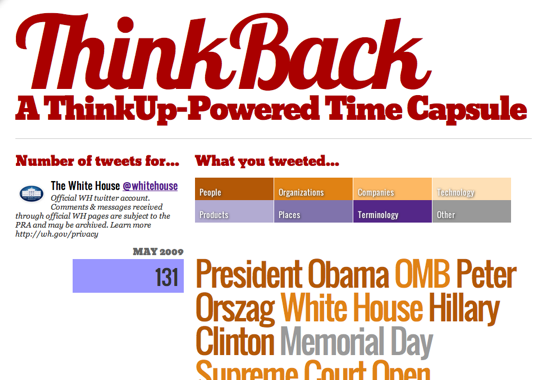
ThinkBack analyzes your entire Twitter history, extracts entities from the text, and colors them based on category. Grouped by month, it also gives you a quick glimpse at your posting activity over time.
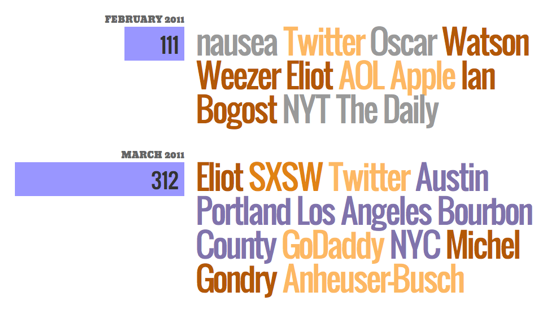
For the entity extraction, I used an excellent free web service called AlchemyAPI to extract people, places, events, product names and other keywords from everything I’ve ever posted. They provide a category for each, which I assigned a color.
I also tested two other free web services that offer entity extraction, text-processing.com and Zemanta. Finding and categorizing keywords from short status updates is no small feat, but AlchemyAPI does a remarkable job. (If you’d like to play around with all three, support for both Zemanta and text-processing.com is commented out in the source code, but easily swappable with AlchemyAPI.)
ThinkBack also uses four typefaces from Google Web Fonts, my first time using them and dead simple to implement. For free fonts, the quality’s surprisingly great, with several faces commissioned by Google itself. For a quick, free hack, it’s a great alternative to Typekit.
I also used a very simple PHP templating language called RainTPL, which I chose as a lightweight alternative to Smarty. In practice, I found it too simple. Its handling of complex data structures and loops required me to jump through hoops that shouldn’t be necessary. (I’ll stick with Smarty next time.)
Anyway, you can download the code here, it only requires PHP and access to a recent version of ThinkUp. Feel free to fork it and submit a pull request for anything you add!