
37 Signals' Jason Fried on how to make money
— a quick dip into Jason’s psyche in six personal anecdotes #Help Archive Team save Yahoo! Video
— 7TB saved so far, they need geeks with bandwidth/storage and cash for hard drives ASAP #Tissue engineer prints a new kidney on TED stage
— also: self-driving cars; this week, the future is in Long Beach #Marble Run, collaborative HTML5 marble game
— winner of the Mozilla Labs gaming contest, with code on Github via r/WebGames #Reddit interviews Ken Jennings
— “I can’t go anywhere in public where there might be old people, like Hallmark stores or cemeteries.” #Gina Trapani on the case against drop-down identities
— related: the controversy over making gender a text field in Diaspora #Warner Bros. acquires Blade Runner prequel/sequel rights
— there should be a law forbidding sequels to universally-loved 30-year-old films #Snapshots from a rock n' roll marriage
— achingly personal story of the breakup of a Black Keys’ marriage via twitter.com #Installing every version of Windows from 1.0 to Windows 7, in order
— surprisingly entertaining, window colors were retained from Windows 2.0 to Windows 2000 #Esquire's profile of Ray Towler, a Cleveland man wrongly convicted to 30 years in prison
— no amount of money can make this right via Kottke #Apple introduces iPad 2
— thinner than an iPhone 4, 9x faster, two cameras, cover, same battery life, same price #Mitoza, surreal web toy
— then the evil eggplant opened an ice cream store inside of the giant egg… #Thom Yorke Smashes Dead Fish on Washer-Dryer
— “sorry.? I like farts a lot. I’m from the fart generation.” via b3ta #Lanyrd's Guide to SXSW Interactive
— I’m putting on Worst Website Ever again this year with an amazing lineup #Charlie Sheen on Good Morning America
— he has tiger blood running through his veins via twitter.com #Tracking the biggest losers in Google's content farm algorithm changes
— love the hand-wringing in the comments #The economics of indie writers in the Kindle Marketplace
— also, how indie successes are shifting the culture of openness #Gina Trapani runs the numbers on ThinkUp's first year
— an amazing community working on an amazing project #Peter Weller on the RoboCop status in Detroit
— first Kickstarter project officially endorsed by RoboCop #Pattern, a Python module for mining web data
— mining popular services, language parsing, and dataviz in one handy bundle via Pinboard #How I Indexed The Daily
For the last three weeks, I’ve indexed The Daily. Now that my free trial’s up, I’ve had an intimate look at what they have to offer and, sad to say, I don’t plan on subscribing. As a result, I’m ending The Daily: Indexed, my unofficial table of contents for every article they published publicly.
I’m surprised and grateful that The Daily executive and legal team never tried to shut it down. On the contrary, when asked directly about it, publisher Greg Clayman said, “If people like our content enough to put it together in a blog and share it with folks, that’s great! It drives people back to us.” They seem like a nice bunch of folks, and I hope they succeed with their big publishing experiment.
But now that I’m ending it, I can finally address the most common question — how did I do it?
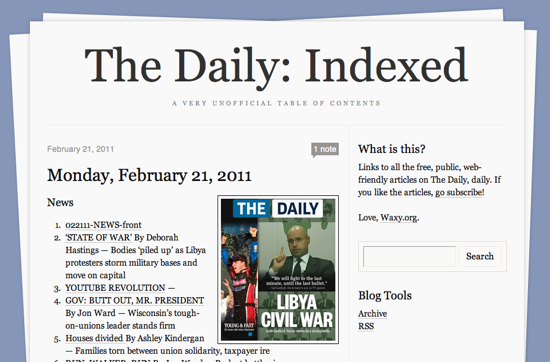
The Daily: Indexed is just a list of article headlines, bylines, and links to each article on The Daily’s official website. Anyone can grab the links from the Daily iPad app by clicking each article’s “Share by Email” button, but that would’ve taken me far too long. So, how to automate the process?
When you first start The Daily application, it connects to their central server to check for a new edition, and then downloads a 1.5MB JSON file with the complete metadata for that issue. It includes everything — the complete text of the issue, layout metadata, and the public URLs.
But how can you get access to that file? My first attempt was to proxy all of the iPad’s traffic through my laptop and use Wireshark to inspect it. As it turns out, The Daily encrypts all traffic between your iPad and their servers. I was able to see connections being made to various servers, but couldn’t see what was being sent.
Enter Charles, a brilliantly-designed web debugging proxy for Mac, Windows, and Linux. By default, Charles will listen to all of your HTTP network traffic and show you simple, but powerful, views of all your web requests. But it can also act as an SSL proxy, sitting in the middle of previously-secure transactions between your browser and an SSL server.
After grabbing the JSON, I was able to write a simple Python script to extract the metadata I needed and spit out the HTML for use on the Tumblr page. Here’s how to do it.
Configuring Charles
1. Download and install Charles on your desktop machine. On your iPad, navigate to http://charlesproxy.com/charles.crt to trust Charles’ SSL certificate.
2. For Mac users, start Network Utility to get your desktop’s local IP address. Start your iPad, make sure it’s on the same wireless network as your desktop, and go into Settings>Network>Wi-Fi. Select the wireless network, and click the right arrow next to it to configure advanced settings. Under “HTTP Proxy,” select “Manual.” Enter the IP address of your desktop for “Server” and enter in “8888” for the port.
3. Now, start Charles on your desktop and, on the iPad, try loading any website. You should see assets from that website appear in Charles. If so, you’re ready to sniff The Daily’s iPad app.
Indexing the Daily
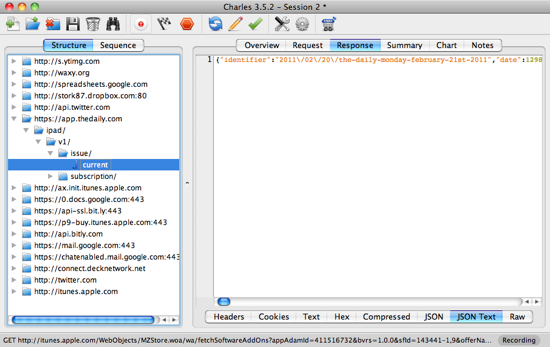
1. Start the Daily app on the iPad. Wait for it to download today’s issue. In Charles, drill down to https://app.thedaily.com/ipad/v1/issue/current, and select “JSON Text.”
2. Copy and paste the raw JSON into a text file.
3. This Python script takes the JSON file as input, and spits out a snippet of HTML suitable for blogging. I simply pasted the output from that script into Tumblr, made a thumbnail of the cover, and published.
The End
So, that’s it! Hope that was helpful. If any fan of The Daily out there wants to take over publishing duties, I’ll happily pass the Tumblr blog on to you.
