Today, Netflix posted some interesting research, tracking the performance of their streaming service on the top ISPs in the U.S.
Sadly, the charts were completely useless to me — a pile of mostly-indistinguishable lines. Along with one out of every 14 American males (about 7%), I’m red-green colorblind.
This is hard for non-colorblind people to understand, so I pulled together a couple examples. Here’s a split comparison of the original chart, showing what people with normal vision see compared to me and my crappy eyes.
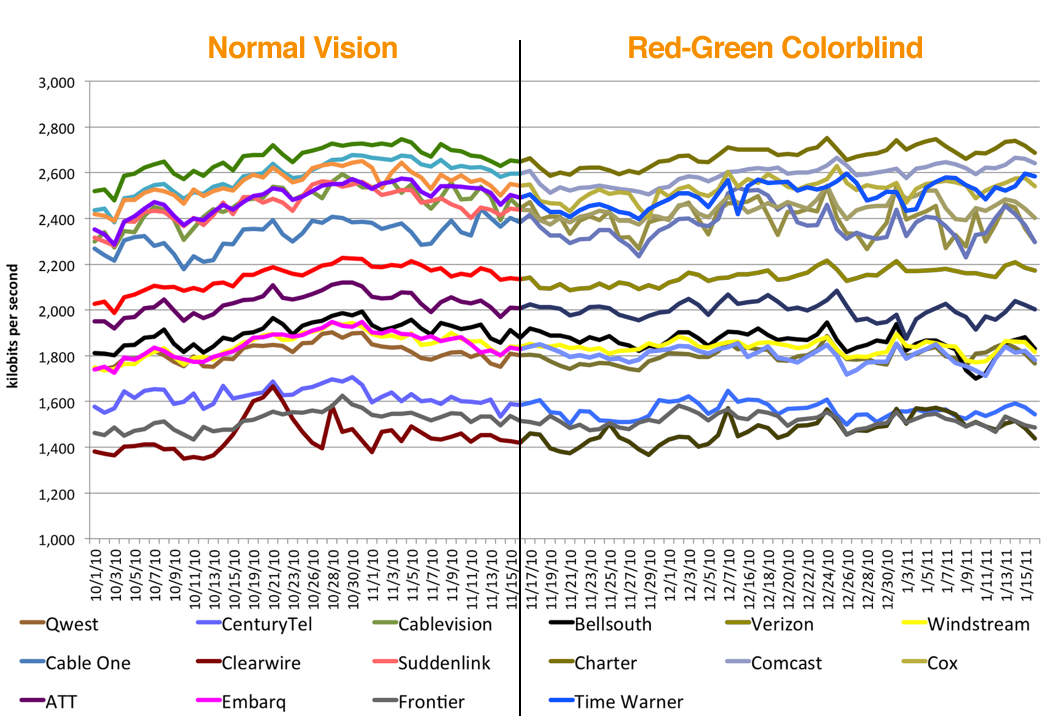
(Click to view large.)
Two simple solutions:
1. Label your lines. When you have more than three data points in a line chart, legends fall apart quickly whether you’re colorblind or not. A label next to each line makes any chart much more readable. Here’s a quick remake I whipped up. (Thanks to Greg for helping me get the colors right.)

(Click to view large.)
2. Pick colorblind-safe colors. If you have to use a legend, be kind and pick something people like us can see. Photoshop’s supported drop-dead simple colorblind simulation since CS4, or you can check your images or webpages for free using the Vischeck colorblind simulator.
When doing the right thing is this easy, it’s really disturbing when it’s dismissed as a waste of time.
A couple years ago, I contacted the husband-and-wife team behind Snopes, the essential resource on urban legends, to let them know about a similar issue. The red/green icons they use to indicate true/false urban legends looked absolutely identical to me. I let them know about the problem and prepared alternate GIFs for them, with a darker red and lighter green. (Incidentally, that’s why colorblind people don’t have trouble with stoplights.)
They not only refused the new images, but actually added a new entry to their FAQ, defending their position:
We chose our red-yellow-green coding system because its “traffic light” pattern can be understood by most of our readers with little or no explanation. While we understand that about 8% of our readership experiences some form of color blindness and therefore cannot distinguish the different colors of bullets, other alternatives we have tried have proved confusing to many of our non-color blind readers. Therefore, we have chosen to stick with a system that works very well for 92% of our readers.
Instead, they recommended hovering over every icon to see the tooltip text. I absolutely adore the work they do on Snopes, but that interaction’s left a sour taste in my mouth ever since. It just doesn’t seem defensible — is slightly darkening a shade of red and brightening a green too much to ask?
I wouldn’t expect anyone to be able to perfectly anticipate every person’s needs; accessibility is extremely hard to get right 100% of the time. But if your ultimate goal is conveying information, open ears and a little empathy can go a long way.
Update: Alex Bischoff took the three images I made for Snopes, and wrote a user script that replaces their images with mine. Install it here for your browser of choice.