
Oscar-winning actor Mary Steenburgen went in for routine surgery, and woke up a songwriter
— prime Oliver Sacks material here via MetaFilter #Gochi Gang explores Brooklyn’s Japan Village with Claire Saffitz and Mike Chen
— first episode from Reina Scully’s new webseries for First We Feast #PayPal drops payments to Pornhub performers
— according to Pornhub, their reversal will affect the livelihoods of over 100k people #The Verge on the cottage industry of Amazon “preppers”
— a competitive industry appears in the middle of nowhere via @mvzelenks #Baking and cooking simulations with mixture theory
— I understand none of this math, but it’s nice to know we’ll have fresh baked bread and cookies in the Matrix via @ddiakopoulos #The Comics Reporter’s Tom Spurgeon, dead at 51
— a tireless advocate for the comics medium, everyone I know in comics is mourning #Private equity company acquires .org registry
— in June, ICANN removed price caps for .org domains #The Daily chats with Leo, a 3rd grader, about Trump’s impeachment
— incredibly charming, and surprisingly insightful, to see it through a child’s eyes via @hayleyfiasco #The new 16″ MacBook Pro has a good keyboard
— scissor switches, a real Esc key, and old arrow keys; the least important news today, but I’m still happy about it #The Blue Donkey
— MSCHF created a fake Seamless restaurant to secretly funnel corporate perks to political candidates who oppose big corporations #BBC Radio 4 on the work and tragic death of TempleOS creator Terry A. Davis
— I missed the news of his passing last year; his mental illness inspired fascinating work, along with a history of racist, homophobic paranoia #Little Runmo
— two years in development, a surreal animated short inspired by side-scrolling platformers via twitter.com #Unmixer, extract and remix loops from any song
— just announced and slow right now, but read about how it works while you wait via @ada_rob #Picket signs from the Disney Artists’ strike of 1941
— more info here, including video via twitter.com #“OK Boomer” isn’t really about age
— it’s shorthand for power, money, and privilege via @TaylorLorenz #NYT’s Caity Weaver digs into the Valentine’s Day text message mystery
— a third-party named Syniverse was responsible for firing off 168,149 messages, 265 days late via @Jonesieman #Sanam Maher on TikTok in Pakistan
— while some are trying to ban it, TikTok is giving some Pakistani users an audience and new source of income via Web Curios #The Size of Space
— from Neal Agarwal’s excellent Neal.fun, a reliable source of joyful internet via Kottke #AV Club’s 100 best, worst, and weirdest of the internet in the 2010s
— any “best of” list that starts with Demi Adejuyigbe is a winner #Neural network tries to reconstruct photorealistic faces from emoji and emotes
— pure nightmare fodder, but especially the pepperoni pizza made of lips via @jonathanfly #Teachable Machine 2.0 launches
— dead simple tool to train a machine learning model entirely in the browser #Mysterious text messages from Valentine’s Day were received late last night
— upsetting texts from ex-partners, dead friends, and family members #State-of-the-art language processing with ten lines of TensorFlow 2.0
— Hugging Face’s Transformers library had me generating text with GPT-2 on my laptop in about five minutes #Airbnb promises to verify all 7 million listings after VICE report exposes scam
— a surprising response to Allie Conti’s outstanding exposé #Uber’s self-driving car involved in fatal crash couldn’t detect pedestrians outside of crosswalks
— reminder that the crime of “jaywalking” was invented by automakers #Rating every horse emoji
— “Pasterns and fetlocks appear abnormal, suggest radiographs before purchase.” #The Deletion of Yahoo! Groups and Archive Team’s Rescue Effort
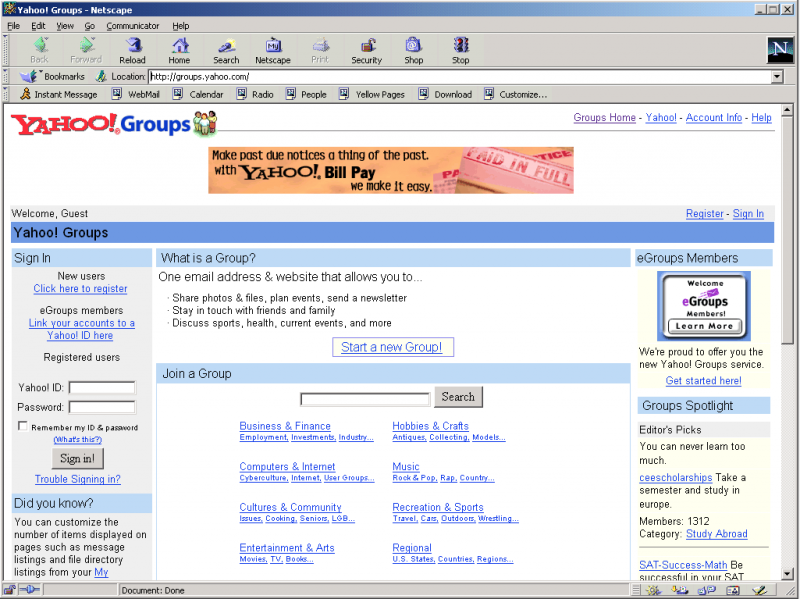
On December 14, everything ever posted to Yahoo! Groups in its 20-year history will be permanently deleted from the web. Groups will continue running as email-only mailing lists, but all public content and archives — messages, attachments, photos, and more — will be deleted.
You have until then to find your Yahoo login, sign into their Privacy Dashboard, and request an archive of your Yahoo! Groups.
For me, it took ten full days to get an email that my archive was ready to download — are they doing this by hand!? — but it appears complete: it contained a folder for every group I belonged to, each containing their own ZIP files for messages, files, and links.
The messages archive is a single plain-text file in Mbox email format with every message every posted to the group. That’s enough for me, but if you wanted, you could import into Thunderbird or any other mail app that support Mbox.
In the late ’90s and early 2000s, I belonged to several Yahoo! Groups (and its earlier incarnation, eGroups) for niche online communities, former jobs, small groups of friends, and weird internet side projects. Until the launch of Google Groups, it was the de facto free way to easily set up a hosted mailing list and discussion forum.
The Archive Team wiki charts the rise and fall of Yahoo Groups, showing a peak in 2006, and rapid fall after that.

Many of these private groups are effectively darkweb, accessible only to members of the group. If you don’t save a copy of the private groups you belong to, it may very well be lost for good.
Archive Team’s Rescue Effort
As you’d expect, the volunteer team of rogue archivists known as Archive Team are working hard to preserve as much of Yahoo! Groups as possible before its shutdown.
Their initial crawl discovered nearly 1.5 million groups with public message archives that can be saved, with an estimated 2.1 billion messages between them. As of October 28, they’ve archived an astounding 1.8 billion of those public messages.
Unfortunately, archiving the files, photos, attachments, and links in those groups is much harder: you have to be signed in as a member to view that content, which requires answering a reCaptcha. If you’d like to help answer reCaptchas, they made a Chrome extension to assist with the coordination effort.
If you’d like to nominate a public Yahoo! Group to be saved by Archive Team, you can submit this form. If you’d like them to archive a private group, you can send a membership invite to this email address and it’ll be scheduled for archiving. More details are on the wiki.
Blot
— incredibly minimalist file-based blog service, actively developed in public via Chris Glass #Light Commands
— inject unauthorized voice commands into Google, Amazon, Facebook, and Apple voice assistants with lasers! via @kwiens #Reporter writes about getting fired by the Des Moines Register
— cowardly behavior from the paper, withering under a firestorm of criticism fueled by bad-faith actors #Painting with Pure CSS

Last year, I fell in love with Diana Smith’s stunning CSS paintings: Francine, Vignes, and Zigario. (I loved them so much, I asked her to speak at XOXO’s Art+Code event last year.)
Incredibly, Diana types these out by hand, layering HTML elements and CSS properties with only a text editor and Chrome Developer Tools. In this post, she talks about the CSS properties she relies on most, with links to what her work would look like without each.
She just released her latest illustration, Lace, inspired by Flemish/baroque art and coded in two weekends, and it’s my favorite so far.
Her illustrations are designed for Chrome, but don’t let that stop you from viewing them in other browsers, especially older ones. Each collapses and distorts in unexpected ways, revealing the subtle differences between browsers as they evolved over time.
It’s only designed for Chrome, but don’t let that stop you from trying it in other browsers: the older, the better! Here it is in Chrome 17, Firefox 3.6, Chrome 9, and (my favorite) Internet Explorer 5.1.7 for Mac. pic.twitter.com/dFNYKi8Myf
— Andy Baio (@waxpancake) May 1, 2018
Here’s what “Lace” looks like in some other browsers I tried.





Fast and Free Music Separation with Deezer’s Machine Learning Library

Cleanly isolating vocals from drums, bass, piano, and other musical accompaniment is the dream of every mashup artist, karaoke fan, and producer. Commercial solutions exist, but can be expensive and unreliable. Techniques like phase cancellation have very mixed results.
The engineering team behind streaming music service Deezer just open-sourced Spleeter, their audio separation library built on Python and TensorFlow that uses machine learning to quickly and freely separate music into stems. (Read more in today’s announcement.)
You can train it yourself if you have the resources, but the three models they released already far surpass any available free tool that I know of, and rival commercial plugins and services. The library ships with three pre-trained models:
- Two stems – Vocals and Other Accompaniment
- Four stems – Vocals, Drums, Bass, Other
- Five stems – Vocals, Drums, Bass, Piano, Other
It took a couple minutes to install the library, which includes installing Conda, and processing audio was much faster than expected.
On my five-year-old MacBook Pro using the CPU only, Spleeter processed audio at a rate of about 5.5x faster than real-time for the simplest two-stem separation, or about one minute of processing time for every 5.5 minutes of audio. Five-stem separation took around three minutes for 5.5 minutes of audio.
When running on a GPU, the Deezer team report speeds 100x faster than real-time for four stems, converting 3.5 hours of music in less than 90 seconds on a single GeForce GTX 1080.
Sample Results
But how are the results? I tried a handful of tracks across multiple genres, and all performed incredibly well. Vocals sometimes get a robotic autotuned feel, but the amount of bleed is shockingly low relative to other solutions.
I ran several songs through the two-stem filter, which is the fastest and most useful. The 30-second samples are the separations from the simplest two-stem model, with links to the original studio tracks where available.
🎶 Lizzo – “Truth Hurts”
Compare the above to the isolated vocals generated by PhonicMind, a commercial service that uses machine learning to separate audio, starting at $3.99 per song. The piano is audible throughout PhonicMind’s track.
🎶 Led Zeppelin – “Whole Lotta Love”
The original isolated vocals from the master tapes for comparison. Spleeter gets a bit confused with the background vocals, with the secondary slide guitar bleeding into the vocal track.
🎶 Lil Nas X w/Billy Ray Cyrus – “Old Town Road (Remix)”
Part of the beat makes it into Lil Nas X’s vocal track. No studio stems are available, but a fan used the Diplo remix to create this vocals-only track for comparison.
🎶 Marvin Gaye – “I Heard It Through the Grapevine”
Some of the background vocals get included in both tracks here, which is probably great for karaoke, but may not be ideal for remixing. Compare this to 1:10 in the studio vocals.
🎶 Billie Eilish – “Bad Guy”
I thought this one would be a disaster—the vocals are heavily processed and lower in the mix with a dynamic bass dominating the song—but it worked surprisingly well, though some of the snaps bleed through.
🎶 Van Halen – “Runnin’ With The Devil”
Spleeter had a difficult time with this one, but still not bad. You can compare the results generated by Spleeter to the famously viral isolated vocals by David Lee Roth, dry with no vocal effects applied.
Open-Unmix
The release of Spleeter comes shortly after the release of Open-Unmix, another open-source separation library for Python that similarly uses deep neural networks with TensorFlow for source separation.
In my testing, Open-Unmix separated audio at about 35% of the speed of Spleeter, didn’t support MP3 files, and generated noticeably worse results. Compare the output from Open-Unmix below for Lizzo’s isolated vocals, with drums clearly audible once they kick in at the 0:18 mark.
The quality issues can likely be attributed to the model released with Open-Unmix, which was trained on a relatively small set of 150 songs available in the MUSDB18 dataset. The team behind Open Unmix is also working on “UMX PRO,” a more extensive model trained on a larger dataset, but it’s not publicly available for testing.
What Now?
Years ago, I made a goofy experiment called Waxymash, taking four random isolated music tracks off YouTube, and colliding them into the world’s worst mashup. But I was mostly limited to a small number of well-known songs that had their stems leak online, or the few that could be separated cleanly with channel manipulation.
With processing speeds at 100 times faster than real-time playback on a single GPU, it’s now possible to turn all recorded music into a mashup or karaoke without access to the source audio. It may not be legal, but it’s definitely possible.
What would you build with it? I’d love to hear your ideas.
Thanks to Paige for the initial tip!
Updates
This thing is dangerously fun.
November 11. You can now play with Spleeter entirely in the browser with Moises.ai, a free service by Geraldo Ramos. After uploading an MP3, it will email you a link to download the stems.
Also, the Deezer team made Spleeter available as a Jupyter notebook within Google Colab. In my testing, larger audio files won’t play directly within Colab, and will need to be downloaded first to listen to.